Asset overview
Understand the setup.
Then make it your own.
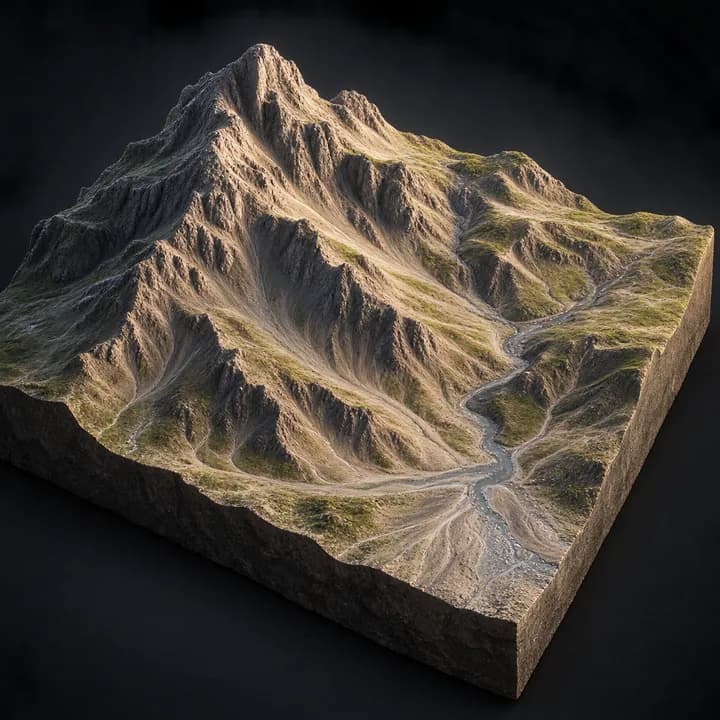
Erosion Pro is a Blender Geometry Nodes asset in OmniKit’s nature collection.
MESH INPUT: drop on a mesh, or feed mesh geometry to Terrain. Apply object scale for predictable distances. | Erosion Pro - hydraulic and thermal erosion on any terrain mesh. Rain collects, flows toward hollows and evaporates; water carries sediment up to a capacity set by flow and slope, cutting channels where it can carry more and laying silt down where it cannot; slopes past the talus angle slump toward their neighbours. Three layers - a pure-math flow controller where one Strength slider scales every rate and Iterations is capped against a vertex budget; an iterative terrain core. Scale dials the whole result back without re-running. Writes NF_erosion_water and NF_erosion_sediment for shading.
Its exposed inputs include Strength, Iterations, Rain, Erosion Rate, Deposition, Evaporation, Thermal. Review the control reference below to plan a suitable setup.
Source and setup notes
Source node name: OMNI - Erosion Pro
Collection: 22 Geometry Nodes/Environment/Terrain & Landscape
Structural inspection used Blender 5.2.0 LTS. Other releases and render engines require separate checks.
How to approach this asset
- Check the source notes for the expected mesh, curve, field, shader or World context.
- Start with a disposable scene and a suitable input. Inspect required object, material or collection inputs.
- Adjust one documented control at a time. Evaluate the result before using it in a production project.