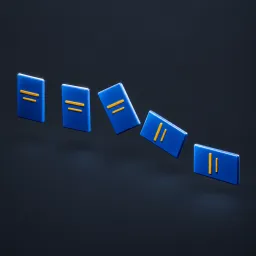
Asset overview
Understand the setup.
Then make it your own.
Fan Layout Pro is a Blender Geometry Nodes asset in OmniKit’s motion collection.
MESH PRODUCT INPUT. Expands a stacked set of product copies into a curved fan using quintic smoothstep. Duration is one-way seconds; Ping Pong returns over the next Duration. Spread Angle radians. Stack is along Z; open fan follows XY with Z rotation. Input bounds center is product pivot. Not an exploded-parts tool or collision solver; thin product cards work best. Stores per-copy progress/index; materials retained. See Product Motion Examples scene. AI preview is illustrative.
Its exposed inputs include Bypass, Auto Play, Time, Start Time, Time Scale, Duration, Ping Pong. Review the control reference below to plan a suitable setup.
Source and setup notes
Source node name: OMNI - Fan Layout Pro
Collection: 08 Motion Graphics/Product Animation
Structural inspection used Blender 5.2.0 LTS. Other releases and render engines require separate checks.
How to approach this asset
- Check the source notes for the expected mesh, curve, field, shader or World context.
- Start with a disposable scene and a suitable input. Inspect required object, material or collection inputs.
- Adjust one documented control at a time. Evaluate the result before using it in a production project.